Top Free and Paid Adobe Illustrator Alternatives for Designers in 2026
By DealKeep Team · 2026-06-11
Looking for an adobe illustrator alternative in 2026? You have lots of choices! Many designers want tools that cost less, work on different devices, or fit their style. Here are some top picks you might like:
Tool
Price
Best For
Inkscape
Free
Technical drawings
Vectr
Free
Beginners
Affinity Designer
One-time fee
Professionals
CorelDRAW
Subscription
Industrial design
Figma
Freemium
UI/UX teams
Try both free and paid options to see what works best for you.
Key Takeaways
- Explore both free and paid alternatives to Adobe Illustrator to find the best fit for your design needs.
- Consider cost and subscription models when choosing a design tool; free options like Inkscape and Vectr can be powerful for beginners.
- Look for essential features like pen tools, layers, and text editing to ensure your design software meets your creative requirements.
- Prioritize collaboration capabilities if you work in teams; tools like Figma offer real-time editing and feedback.
- Test out different tools with free trials or demos to discover which one aligns with your workflow and style.
Why Choose an Adobe Illustrator Alternative
Reasons to Switch
Have you ever wondered why so many designers look for an adobe illustrator alternative? You are not alone! Many people want something different for a few simple reasons:
- Cost: Adobe Illustrator can get expensive, especially if you pay every month. If you want to save money, you might look for a free or one-time purchase tool.
- Subscription Fatigue: Subscriptions can add up fast. You might already pay for music, movies, and other apps. Adding another monthly fee may not feel right.
- Different Workflow Needs: Maybe you want a tool that works better for your style. Some designers need special features or want a program that runs on their favorite device.
- Platform Flexibility: Not everyone uses the same computer. Some adobe illustrator alternative options work on Windows, Mac, and even Linux.
Tip: If you want to avoid subscriptions, check out GIMP, Inkscape, or Krita. These tools are free and open-source. Many designers love them for their power and flexibility.
Illustrator Limitations
Adobe Illustrator is a great tool, but it does not fit everyone’s needs. Here are a few things you might not like:
- High Price: The cost can be too much for students or new designers.
- Steep Learning Curve: Some people find Illustrator hard to learn. If you want something simple, you might get frustrated.
- Resource Heavy: Illustrator needs a strong computer. If your device is older, it might run slow.
- Limited Collaboration: Working with a team can be tricky. Some adobe illustrator alternative tools make sharing and teamwork much easier.
Choosing the right tool depends on what you need. You have many options, so try a few and see what fits your style best!
Key Features for Vector Design
Essential Tools
When you pick a vector design tool, you want to make sure it has the basics. These features help you create, edit, and share your designs with ease. Here are some must-haves:
- Pen and Shape Tools: You need these to draw lines, curves, and shapes. They let you build anything from logos to icons.
- Layers: Layers help you organize your work. You can move things around without messing up other parts.
- Text Editing: Good text tools let you add words, change fonts, and adjust spacing. This is key for posters or social media graphics.
- Color Controls: You want to pick colors, make gradients, and use swatches. This makes your art pop.
- Export Options: Save your work in different formats like SVG, PDF, or PNG. This helps you share your designs anywhere.
Tip: Try out the pen tool in each app. Some feel smoother than others. You might like one more than the rest!
Workflow Compatibility
You want your design tool to fit your style and daily routine. Here’s what to look for:
- Cross-Platform Support: Can you use the app on Windows, Mac, or even your tablet? This gives you freedom to work anywhere.
- Cloud Sync and Collaboration: Some tools let you save files online or work with friends in real time. This is great for teams or school projects.
- Import/Export Compatibility: Make sure you can open files from other programs. You don’t want to lose your old work.
- Custom Shortcuts: Speed up your work with keyboard shortcuts. Many apps let you set your own.
Feature
Why It Matters
Cross-Platform
Work on any device
Collaboration
Teamwork made easy
File Compatibility
No lost projects
Custom Shortcuts
Faster design process
If you check for these features, you’ll find a tool that feels just right for you. Happy designing! 🎨
Top Free Adobe Illustrator Alternatives
 Image Source: unsplash
You want a great adobe illustrator alternative, but you don’t want to pay a lot. Let’s look at some of the best free options. Each tool has its own strengths, so you can pick what fits your style and needs.
Inkscape
Inkscape stands out as a mature and widely regarded adobe illustrator alternative. You can use it on Windows, macOS, and Linux, which gives you flexibility no matter what computer you have. Inkscape makes editing gradients easy. You can change them right on the canvas, which saves time. The node editing tool is simple. You only need one tool to do everything, unlike Illustrator, which uses several tools for the same job.
If you have an older computer, Inkscape runs well without needing expensive hardware. You don’t need to upgrade your device to start designing. Many users love Inkscape for technical drawings, logos, and vector art. It’s a solid choice if you want something powerful but easy to use.
Tip: Inkscape is perfect for students and hobbyists who want professional results without spending money.
Vectr
Vectr is a user-friendly adobe illustrator alternative. You can jump in and start creating projects fast. The interface is simple, so you won’t feel lost. Vectr works online and on your desktop, so you can design wherever you want.
You get basic shape tools and an easy pen tool. If you’re new to vector design, Vectr helps you learn without feeling overwhelmed. Some advanced features are missing, so professional designers might want more. Aligning elements can be tricky, and you won’t find deep customization options.
- Vectr is completely free.
- It’s ideal for beginners and quick projects.
- You can use it in your browser or download it.
Note: If you want to make simple graphics or learn vector art, Vectr is a great starting point.
Figma
Figma is famous for its collaborative features. You and your team can work together in real time. This makes Figma a top adobe illustrator alternative for UI/UX designers and groups. You can share designs, leave comments, and see changes instantly.
Here’s a quick look at Figma’s collaboration compared to other tools:
Tool
Collaboration Features
Figma
Real-time, in-depth collaboration
Canva
Basic collaboration
Miro
Broad, conceptual collaboration
Lunacy
Good collaboration
InVision
Extensive real-time collaboration
Sketch
Improved, but less integrated
Figma works in your browser, so you don’t need to install anything. You can use it on any computer. The free version gives you plenty of features for small teams and solo designers.
Tip: Figma is perfect if you want to design with friends or classmates and need easy sharing.
GIMP
GIMP is a powerful suite replacement for Adobe tools. You can edit photos, create graphics, and work on many types of projects. GIMP is free and open-source. You can use it on Windows, macOS, and Linux.
Here’s a quick table to show GIMP’s pros and cons:
Pros
Cons
Powerful raster editing
Steeper learning curve
Free and open-source
Not mainly for vector graphics
Works on Mac, Linux, Windows
No dedicated support
GIMP is best for photo editing and raster graphics. If you need vector tools, you might want to try Inkscape or Vectr. Still, GIMP gives you a lot of creative freedom.
Note: GIMP is great if you want a free tool for photo editing and don’t mind learning something new.
Krita
Krita shines as an adobe illustrator alternative for illustration and painting. You get a huge collection of brushes. You can customize them to fit your style. Krita supports layers and channels, so you can build complex artwork. The canvas has no borders, which lets you work without limits.
- Krita lets you adjust brush size, opacity, and hardness.
- You can create animations and patterns with wrap-around mode.
- It works well with Wacom tablets for smooth drawing.
- Color management helps you get accurate colors for print.
- High-DPI support gives you sharp images.
Krita is open-source, so it gets updates and new features from the community. You can manage palettes based on imported images, which makes picking colors easy.
Tip: Krita is perfect for artists who want to paint, illustrate, or animate without paying for expensive software.
If you want a free adobe illustrator alternative, you have many choices. Try a few and see which one feels right for your workflow and style.
Top Paid Adobe Illustrator Alternatives
If you want more advanced features or need a tool for professional work, you might want to try a paid option. These tools give you more power, better support, and extra features that help you create amazing designs. Let’s look at some of the best choices for 2026.
Affinity Designer
You might love Affinity Designer if you want a smooth and modern design experience. This tool stands out because you only pay once, so you don’t have to worry about monthly fees. The interface feels clean and easy to use, even if you’re just starting out. You can switch between vector and raster workspaces, which means you can draw, paint, and design all in one place.
Here’s what makes Affinity Designer special:
- Beginner-friendly interface that helps you get started fast.
- One-time purchase, so you save money in the long run.
- Streamlined UI that keeps your focus on your work.
- Works well with Wacom tablets for drawing and editing.
- Lets you work with both vector and raster graphics.
- Modern sliders and tools for quick adjustments.
- Easy object manipulation and navigation.
You won’t find a dedicated Image Tracing tool here, but you get a lot of value for the price. If you want a cost-effective and powerful adobe illustrator alternative, Affinity Designer is a top pick.
Tip: Affinity Designer is great for freelancers, students, and anyone who wants pro features without a subscription.
CorelDRAW
CorelDRAW gives you a full set of tools for vector design. You can use it for everything from logos to big print projects. Many people like CorelDRAW because it feels user-friendly and works well for intermediate users. You get special features like PowerTRACE for tracing images, the Live Sketch Tool for freehand drawing, and Corel Font Manager for handling fonts.
Here’s why you might choose CorelDRAW:
- User-friendly design, perfect for people who want something simple.
- PowerTRACE lets you turn images into vectors easily.
- Live Sketch Tool helps you draw naturally with a tablet.
- Corel Font Manager keeps your fonts organized.
- You can buy it once or choose a subscription.
CorelDRAW works best for people who want to draw by hand or need a tool for industrial design. If you want something simple but powerful, this could be your new favorite.
Note: CorelDRAW is ideal for intermediate designers and anyone who likes freehand drawing.
Vectornator Pro
Vectornator Pro gives you a complete design experience on iPhone, iPad, and Mac. You can create detailed illustrations, UI designs, and layouts wherever you are. The app feels natural to use, especially if you like working with touch or a stylus.
Some cool features you’ll find in Vectornator Pro:
- Dynamic quick action menu that changes based on what you select.
- Settings for each document and for the whole app.
- Natural touch interface for dragging, zooming, and drawing.
- Freehand drawing with a pen tool for sharp lines and curves.
- Bezier curve support for precise shapes.
- Boolean operations to combine and edit objects.
- Layer management with easy grouping and ungrouping.
- Canvas controls, snapping, and stylus input.
- Brush editor with pressure sensitivity for lifelike strokes.
- Over 2,000 SF symbols for UI design.
- Native emoji support to add fun to your designs.
You’ll find Vectornator Pro easy to use, but it also gives you the power to make complex designs. If you want a tool that works on all your Apple devices, this one is worth a try.
Sketch
Sketch is a vector-based design app that specializes in website design and UI/UX experience, making it a suitable alternative to Adobe Illustrator for UI/UX designers. It offers a clean and efficient user interface, focuses on the needs of both designers and developers, and allows for easy customization and asset export. Additionally, Sketch is more affordable than Adobe Illustrator, with a one-off payment model and free updates for the first year.
You’ll find Sketch perfect if you design websites or apps. The interface feels simple and helps you focus on your work. You can export assets easily, which is great for sharing with developers. Sketch costs less than many other pro tools, and you get free updates for a year.
Tip: Sketch is best for UI/UX designers who want a tool made just for them.
Visme, Piktochart, Easil, Prezent AI
If you work with teams or need to make presentations, these tools can help you a lot. They focus on making design easy for everyone, even if you’re not a pro. You get templates, smart tools, and ways to work together in real time.
Here’s a quick look at what each tool offers:
Tool
Visme
- 10,000+ templates and interactive elements
- Drag-and-drop editor
- Brand kit
- AI-powered design
- Data visualization
- Team collaboration with permissions
Piktochart
- Infographic and report templates
- Data import and chart creation
- Drag-and-drop editor
- Collaboration tools
- Multiple export options
Prezent
- AI for context-rich decks
- Brand control and compliance
- Auto-generates decks fast
- 35,000+ slides
- Real-time collaboration and API integrations
You can use these tools to make infographics, reports, and slides quickly. They help teams stay on brand and work together smoothly. If you want an adobe illustrator alternative for team projects or presentations, these apps are a smart choice.
Note: These tools are perfect for marketing teams, teachers, and anyone who needs to create and share visual content fast.
Innovative and AI-Powered Tools
 Image Source: unsplash
AI Vector Editors
You might notice that design tools in 2026 feel smarter than ever. AI-powered vector editors now help you work faster and make better designs, even if you are just starting out. These editors use intelligent tools to automate many steps. You can let the software handle tricky parts, so you spend more time on your ideas.
For example, Adobe’s Creative Cloud now has generative AI features. You can ask the app to create shapes, suggest colors, or even build whole layouts for you. Canva’s AI assistant gives you media suggestions and can make designs with layers you can edit. This means you get a head start on your project, and you can change anything you want.
Some new platforms, like Uizard and Visily, take things even further. You can type a description or upload a screenshot, and the tool will turn it into a design. Imagine writing “make a login page” and seeing it appear in seconds! These features help you move from idea to finished product much faster.
Tip: Try using AI suggestions when you feel stuck. You might discover a new style or layout you never thought of before!
Collaborative Platforms
Working with a team feels easier now, thanks to new collaborative platforms. You can upload your designs and share them with others for instant feedback. Tools like GoVisually let you send your work to teammates or clients. They can leave comments right on your design, so you know exactly what to fix.
Red Pen is another tool that helps teams work together. You can upload a project and everyone can add notes or ideas. This makes it simple to brainstorm, draft, and get approval without long email chains.
- These platforms help you:Get feedback fast
- Brainstorm with your team
- Approve designs quickly
- Keep everyone on the same page
AI-powered platforms also handle boring tasks for you. They can remove backgrounds, change file formats, and help you make more design ideas in less time. You get to focus on the creative parts, while the software takes care of the rest. This means you can finish more projects and keep your designs looking sharp across all your channels.
Comparison Overview
Features Table
You might wonder how these Adobe Illustrator alternatives stack up side by side. Here’s a handy table that shows what each tool does best, if you can use it for free, and what makes it special. This way, you can spot the differences at a glance and pick the one that matches your needs.
Adobe Illustrator Alternative
Best For
Free Plan
Pricing
Key Features
Affinity Designer
Affordable pro-level design
✅
Free
Speedy, works on Mac, Windows, iPad
Canva
Simple graphics for non-designers
✅
Starts at $10/mo
Drag-and-drop, easy logos, posters, visuals
CorelDRAW
Print-focused design workflows
❌ (trial)
Custom pricing
Strong layout, color tools, great for brochures & logos
Figma
UI/UX design and team collaboration
✅
Starts at $16/mo
Real-time editing, browser-based, Dev Mode for handoff
Inkscape
Linux-friendly, open-source editing
✅
Free
Full-featured, customizable, great for illustrations
Sketch
Native macOS vector design
❌ (trial)
Starts at $12/mo
Plugins, easy interface, one-time payment option
Tip: If you want to try before you buy, look for tools with a free plan or trial. You can test features and see if the workflow feels right.
Pricing Summary
You probably care about price as much as features. Some tools let you design for free, while others ask for a monthly fee or a one-time payment. Here’s a quick summary to help you compare:
- Free forever: Inkscape, Canva (basic), Figma (starter)
- One-time payment: Affinity Designer, Sketch (with free updates for a year)
- Subscription: CorelDRAW, Figma (pro), Canva (pro), Sketch (for teams)
If you’re just starting out, you can use Inkscape or Canva without spending money. For pro features and support, Affinity Designer and Sketch offer good value with one-time fees. Teams and advanced users might like Figma or CorelDRAW, even though they cost more each month.
Note: Always check if the tool fits your budget and design needs. Free plans are great for learning, but paid versions unlock more power for big projects.
Choosing the Right Alternative
For Beginners
Starting out in design feels exciting but can also seem overwhelming. You want a tool that matches your lifestyle and skill level. Here are some things you should think about before picking your first vector design app:
- Do you use a desktop or mobile device more often?
- Will you work alone or with others?
- Does the app have a user-friendly interface and helpful tutorials?
- What features do you need, and how much can you spend?
- Are you designing for fun or for work?
- Does the tool fit with other apps you use?
- Is the learning curve gentle enough for you?
If you want something simple, try Vectr or Canva. These apps help you learn fast and don’t cost much. Inkscape is also a good choice if you want more features but still want a free tool.
Tip: Look for apps with lots of tutorials and a friendly community. You’ll learn faster and have more fun!
For Professionals
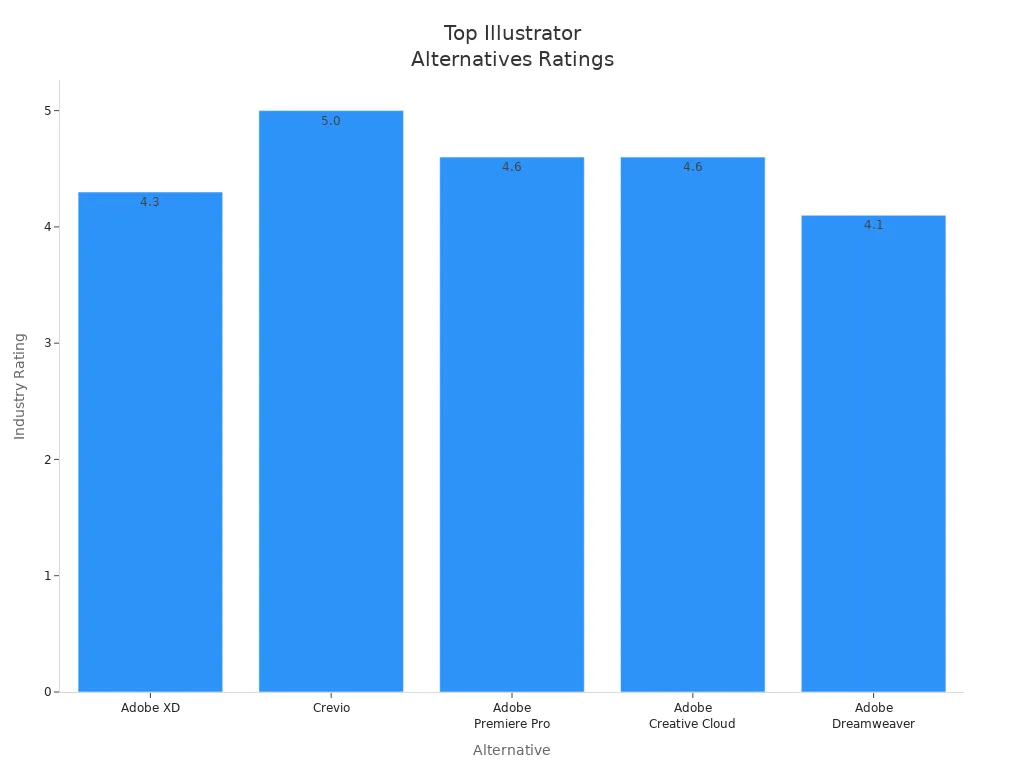
You need a tool that keeps up with your skills and projects. Many pros look for advanced features, strong performance, and good support. Here’s a quick look at some top-rated alternatives:
Alternative
Rating
Reviews
Price
Adobe XD
4.3
241
Starting at $19.99/mo
Crevio
5.0
1
Free plan available
Adobe Premiere Pro
4.6
998
Starting at $19.99/mo
Adobe Creative Cloud
4.6
10,221
Starting at $19.99/mo
Adobe Dreamweaver
4.1
2,118
Starting at $19.99/mo
Affinity Designer and CorelDRAW also stand out for their pro features and flexible pricing. You can create complex designs, manage big projects, and export files for clients with these tools.
Note: Try a free trial before you buy. This helps you see if the workflow fits your needs.
For Teams
Designing with a group brings new challenges. You want tools that make teamwork smooth and easy. Here’s what matters most for teams:
- Strong collaboration features
- Clear and simple user interface
- Good performance, even with big files
- Flexible pricing for groups
- Support for many file types
- Easy import of Adobe Illustrator files
Figma and Visme shine for teams. You can share designs, leave comments, and work together in real time. These tools help everyone stay on the same page and finish projects faster.
Tip: Pick a tool that lets everyone join in, no matter their skill level. Teamwork makes your designs even better!
You have lots of great choices when picking an Adobe Illustrator alternative. Many tools offer similar features at a lower cost and work well on different devices. Before you decide, think about these tips:
- Check your budget for affordable options.
- Look for software that feels easy to use.
- Make sure it works with your other design tools.
- Pick a tool that matches your design needs.
Try free trials or demos to see what fits you best. Stay curious and keep exploring new tools. Have you found your favorite yet? Share your thoughts below! 🚀
FAQ
Can I open Adobe Illustrator files in these alternatives?
Most alternatives let you open or import AI and SVG files. Some tools may not support every feature or effect. You might need to adjust your design after importing. Always check the tool’s documentation for best results.
Are free alternatives good enough for professional work?
You can create professional designs with free tools like Inkscape or Krita. Many designers use them for logos, illustrations, and more. Paid tools offer extra features and support, but free options work well for many projects.
Which alternative is easiest for beginners?
If you want something simple, try Vectr or Canva.You get a clean interface and helpful guides. These tools help you start designing right away, even if you have never used vector software before.
Do these tools work on Mac, Windows, and Linux?
Many alternatives support multiple platforms.
- Inkscape and GIMP run on Mac, Windows, and Linux.
- Affinity Designer works on Mac, Windows, and iPad.
- Some tools, like Sketch, only run on Mac.
Can I use these alternatives for team projects?
Yes! Figma, Visme, and Prezent AI let you work with others in real time. You can share designs, leave comments, and see updates instantly. These features make teamwork easy and fun.
Frequently Asked Questions
What is the best free Adobe Illustrator alternative?
Inkscape is the best free Adobe Illustrator alternative for most users — it is open-source, cross-platform, and handles vector illustration, logos, and SVG editing. Affinity Designer is the top low-cost paid pick with a one-time purchase and no subscription.
Is there a free Adobe Illustrator alternative for Mac or iPad?
Yes. Inkscape runs on Mac and Windows, while Linearity Curve (formerly Vectornator) and Affinity Designer have excellent iPad apps for vector design without an Adobe subscription.
Also read: Top 10 Figma Alternatives for UI/UX Designers in 2026